From files, photo backup and your music collection to Package Center, Docker, notes and mail. Bring the Synology services you use into one familiar native interface.
Actual app capture · Original images · Full proportions
01 / SynoArk / NAS dashboard
Your NAS at a glance. Your tools within reach.
Device information sits alongside CPU, memory and temperature, with network and disk activity below. Put your regular tools in shortcuts so each visit starts where you need it.
Device, uptime, CPU, memory, temperature, network and disk activity
Customize the visibility and order of dashboard modules, shortcuts and navigation
Classic dashboard, console and larger-screen layouts, plus notifications and a personal workspace
Actual app capture · Original images · Full proportions
02 / File Station / Preview / Reading
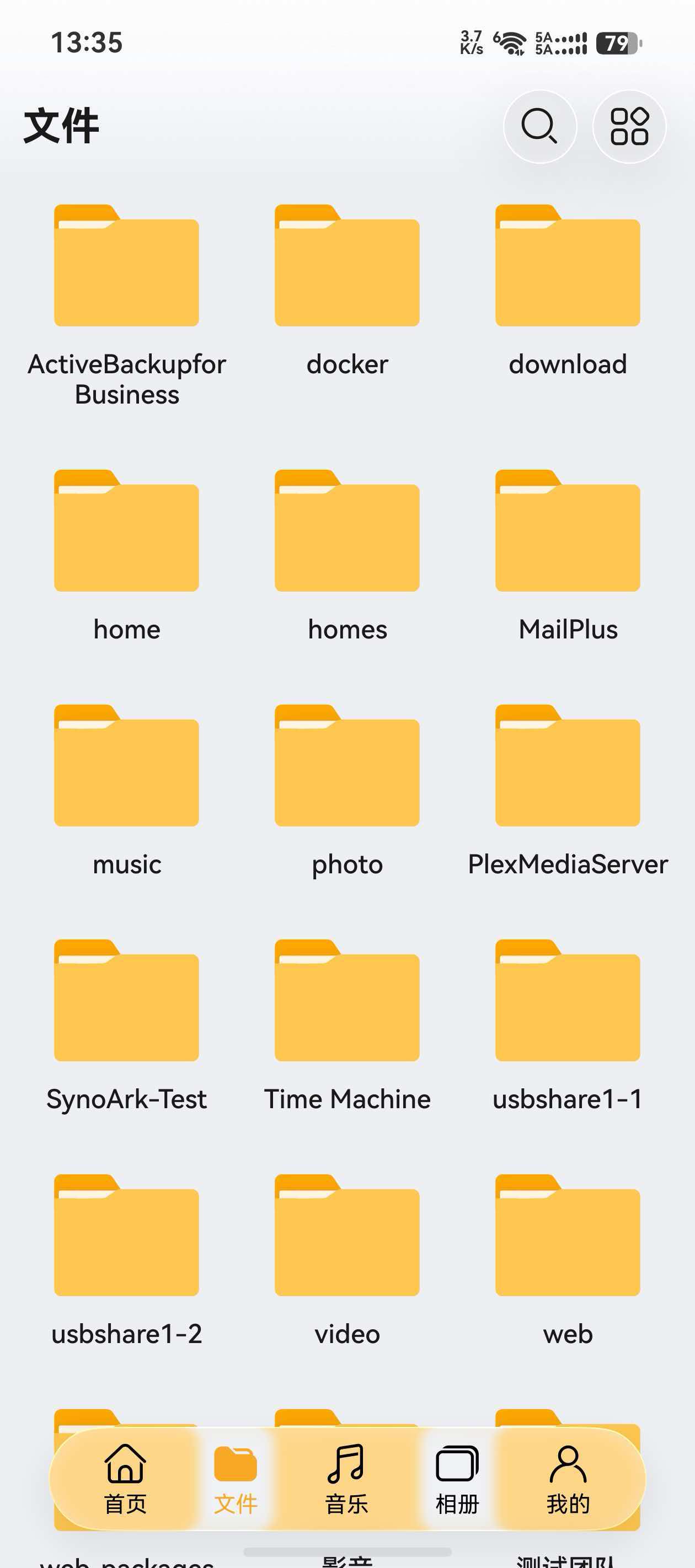
From a shared folder to the file inside.
Browse shared folders, switch views, search and select multiple items, then copy, move, rename, archive or share. Open documents, ebooks and images within the app.
Batch file and folder actions, favorites, share links and transfer management
Preview PDF, DOCX, XLSX and text; read DRM-free ebooks
Preview images and documents, save originals or open them in another app
Actual app capture · Original images · Full proportions
03 / Synology Photos / Moments
Browse your memories. Find more ways into them.
Photos, Albums, Folders, Sharing and Explore offer different ways to organize. Beyond the timeline, find content through people, places, scenes, tags and similar items, and back up your phone to the NAS.
Personal and shared spaces, timelines, albums, folder browsing and sharing
Explore people, places and photo maps, plus scenes, tags and similar items
Preview still and live content, review backup records and confirm phone-storage cleanup
Actual app capture · Original images · Full proportions
04 / Audio Station / Library / Lyrics
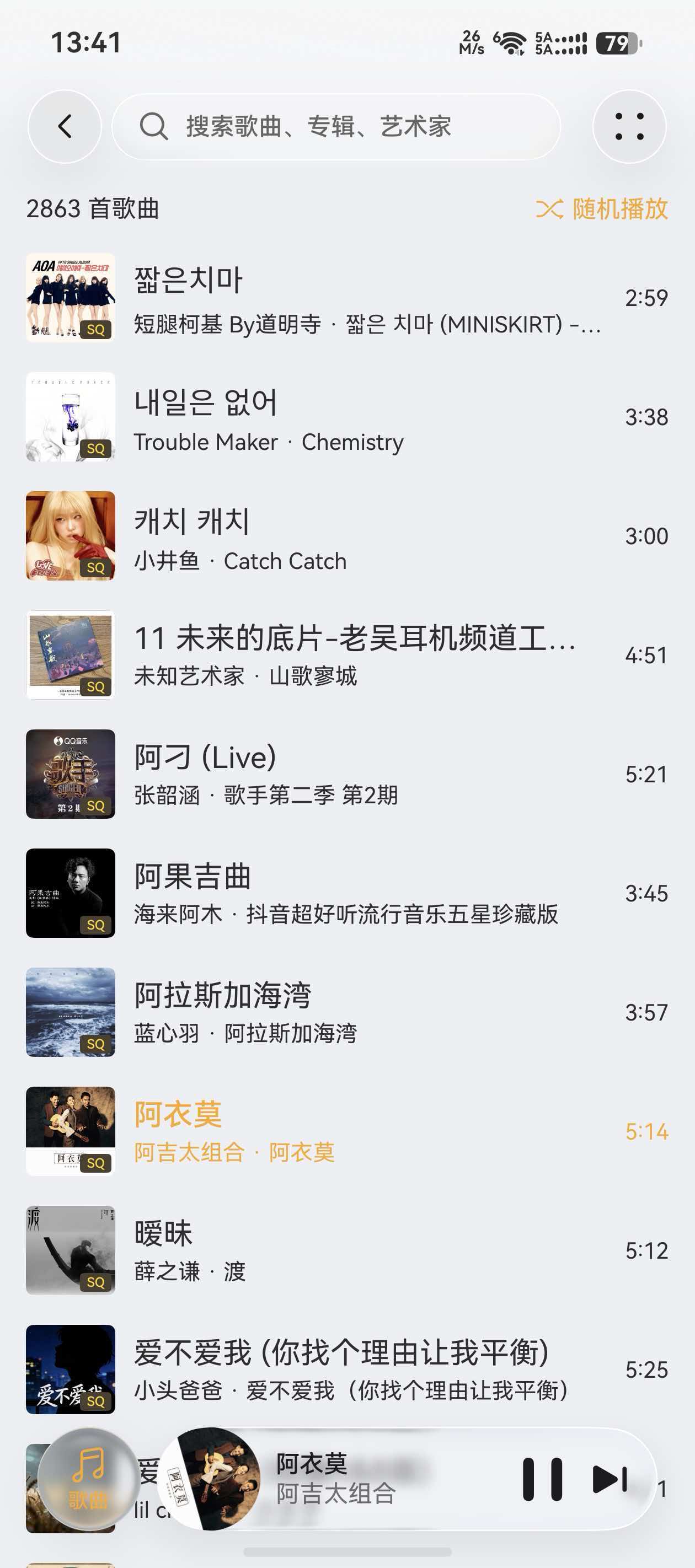
Your whole collection. More than a play button.
Enter your Audio Station library through songs, albums, artists, playlists or folders. Manage playlists and favorites, follow lyrics, and keep listening through the queue and system media controls.
Five library views, search, sorting, and song and album details
Manage playlists, favorites, the queue, play modes and playback speed
Scrolling and word-level lyrics, background playback, system controls and song downloads
Actual app capture · Original images · Full proportions
05 / DSM control panel / Docker / Compose
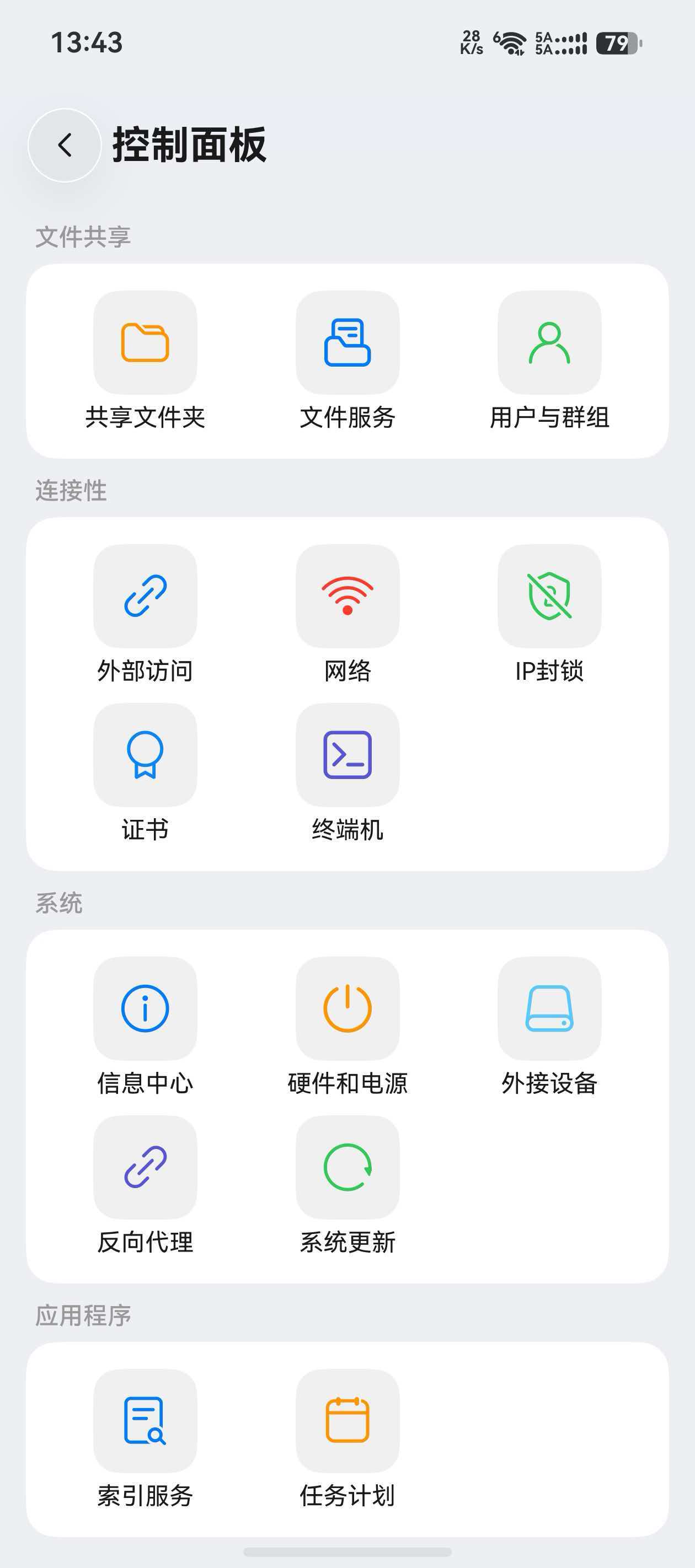
From one container to the whole device.
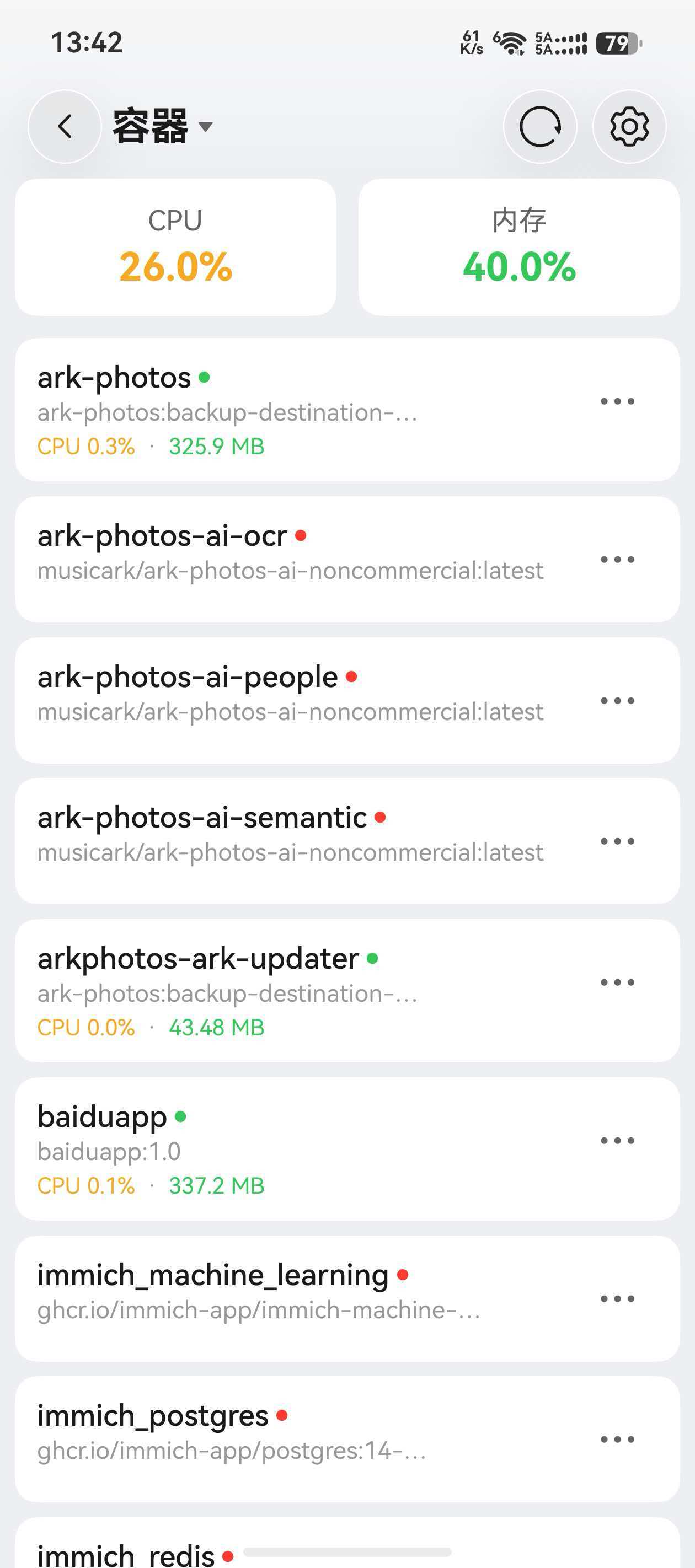
Go beyond containers to images, projects and networks. Dedicated tools cover packages, storage, security and the control panel, with more than a single summary card.
Docker containers, images, registries and Compose projects, with resource and log views
Packages, storage and space analysis, virtual machines, Security Advisor and logs
Control-panel tools for accounts, networking, file services, hardware, power and scheduled tasks
All screenshots use complete, unmodified originals at their original proportions, retaining the Simplified Chinese interface. Changing the website language does not translate text inside images. Interfaces and capabilities on either platform depend on the installed version.
More of the services you use
One familiar place. More of your NAS.
Files and media are just the beginning. Explore Package Center and dedicated tools for downloads, containers, system management and personal productivity.
Connections and accounts
Keep your home and work NAS devices in one app, with separate accounts and content.
Explore capabilities
Sign in with a direct NAS address or QuickConnect
Save multiple NAS devices and accounts, and switch between them
Configure local and external addresses, and inspect the current connection
See device status, recent files and shortcuts from the home screen
Android and HarmonyOS
Files, previews and reading
Find and organize NAS folders, then open documents, images and ebooks on your phone.
Explore capabilities
List and grid views, search, sorting, favorites and batch actions
Transfer, copy, move and archive files, create or edit share links, and share originals through the system
Preview PDF, DOCX, XLSX and images
Read DRM-free EPUB, MOBI and AZW books with adjustable appearance and page turning
Android and HarmonyOS
Photos, albums and discovery
Connect to Synology Photos or Moments and explore your own photo and video collection.
Explore capabilities
Five configurable views: photos, albums, folders, sharing and discovery
Switch personal and shared spaces, browse the timeline, filter and search
Find photos through people, locations, subjects, tags and similar items
Explore photo maps, create albums and manage photo and album sharing
Android and HarmonyOS
Photo backup and cleanup
Back up new photos and videos to your NAS, review their progress and reclaim phone storage.
Explore capabilities
Choose the photos to include and their backup destination
Set network and charging conditions for automatic backup, or start manually
Review backup progress, file lists, failures and retries
Confirm phone-storage cleanup from backup records
Android and HarmonyOS
Audio Station music and lyrics
Bring your NAS music library with you, from songs and albums to your own playlists and listening queue.
Explore capabilities
Browse songs, albums, artists, playlists and folders
Search music, rate favorites, edit playlists and arrange the play queue
Use the full player or mini controls, with artwork and lyrics views
Follow line or word-synced lyrics, seek by lyrics, download songs and use transcoding
Android and HarmonyOS
Transfers and Download Station
Manage phone-to-NAS transfers alongside downloads running on your NAS.
Explore capabilities
Follow phone uploads and downloads in one task center
Create Download Station tasks from links, magnet links or torrent files
Pause, resume or remove tasks, and review completed or failed transfers
Inspect NAS download details, file lists and task settings
Android and HarmonyOS
Package Center and SPK installation
Find NAS packages, inspect their status and maintain your Synology services from your phone.
Explore capabilities
Browse installed packages, official, community and beta catalogs, and package details
Install and update packages, including manual SPK installation
Start, stop and uninstall packages
Manage package sources, Package Center settings and automatic-update preferences
Android and HarmonyOS; NAS administrator access required. Complete dependency handling and unsupported HarmonyOS wizards in DSM on the web
Docker and Compose projects
Inspect and maintain NAS containers from your phone, including logs, images and project configuration.
Explore capabilities
Manage containers, images, projects and networks
Start, stop or restart containers, and inspect resources, configuration and logs
Search registries, pull images and inspect image details
View and edit Compose configuration, and inspect project status
Android and HarmonyOS
System, storage and security
Go beyond a status summary to inspect resources, maintain your NAS and review storage and security.
Explore capabilities
Inspect resources, storage pools, disks and storage analysis reports
Manage networking and certificates, create or edit shared folders, and manage users and groups
Review logs, security-check results and sign-in analysis
View virtual machine status and use virtual machine power controls
Android and HarmonyOS; management uses NAS administrator access
Note Station notes and tasks
Read and write NAS notes, with notebooks, tags, to-dos and sharing in one place.
Explore capabilities
Browse and search notebooks, tags, favorites and the trash
Edit rich text, font sizes, colors, links and embedded images
Manage task completion, priorities, dates and subtasks
Restore deleted notes, share notes and open encrypted notes
Android and HarmonyOS
MailPlus email
Read conversations, organize your inbox and continue drafts stored on your NAS.
Explore capabilities
Browse your inbox, system folders, custom folders and labels
Read threaded messages and manage read status, stars and trash
Compose, reply, forward and save or continue drafts
Read HTML messages, open attachments and edit existing HTML drafts
Android and HarmonyOS; Android has foreground mail checks, with no attachment uploads or persistent push service
Synology Contacts
Bring your NAS address books to your phone, find contact details and back up selected phone contacts.
Explore capabilities
Browse all contacts, address books and labels
Search names, phone numbers, emails and companies, or jump with the letter index
View contact details and open the system dialer, messages, email or sharing
Back up phone contacts; Android skips matches and only adds new entries
Android and HarmonyOS; NAS contact details are read-only on Android
Synology Drive files and sync
HarmonyOS provides Drive file management and folder sync. Android offers basic browsing, previews and saving.
Explore capabilities
Browse personal and team spaces, open files and save them to your device
Recent, starred and shared browsing; HarmonyOS adds labels and trash
HarmonyOS: manage files and folders, and create or manage share links
HarmonyOS: configure two-way, upload-only or download-only folder sync
Full management and folder sync are HarmonyOS features; sync is currently a beta feature
Jellyfin, Emby and Plex
On HarmonyOS, connect your own Jellyfin, Emby and Plex servers alongside Synology packages.
Explore capabilities
Connect servers and accounts, and browse each service’s libraries
Explore movie, TV, album and music details
Browse movie, TV and music libraries and view media details within each service
Customize media home screens, poster presentation and Jellyfin layout ordering
Additional HarmonyOS features
Synology Calendar
View and plan NAS events on your phone, bringing your personal calendar closer to your Synology schedule.
Explore capabilities
Browse month and week views and event details
Create and manage events in the calendar you choose
Sync your phone calendar with Synology Calendar in both directions after granting calendar permission
Lunar-calendar and almanac information alongside your schedule
Additional HarmonyOS features
More services on HarmonyOS
Access additional file and photo services, plus an authenticator, through native mobile interfaces.
Explore capabilities
OpenList and CloudDrive2: connect, browse, preview and organize files
View Cloud Sync and USB Copy tasks and logs; pause, resume or delete Cloud Sync connections
Ark Photos: separate photos, albums, folders and discovery views
Authenticator: add or import tokens, then view and copy verification codes
Additional HarmonyOS features
Modules require the relevant NAS packages and account permissions. Extensions marked HarmonyOS apply to that app.
Your devices. Your connection.
At home or on the go. Stay close to your cloud.
Connect by IP, domain, IPv6 or QuickConnect. Keep multiple NAS devices and accounts, configure local and external addresses, discover devices on your LAN or send a wake request from the sign-in screen.
Explore connections, content, NAS management and productivity, with concrete capabilities and differences for each platform.
A look across platforms
Capability
Android
HarmonyOS
Connections and dashboard
NAS connections and accounts
Direct addresses, IPv6, QuickConnect and two-step verification; multiple NAS devices, local or external addresses and quick account switching
Direct addresses, QuickConnect and two-step verification; local or external addresses, discovery, wake requests and quick account switching
Device status and home screen
Device details, CPU, memory, temperature and network or disk activity; home-screen ordering and refresh-interval settings
Classic and console dashboards, resource trends and notifications; layout, navigation ordering and refresh-interval settings
Files, previews and reading
File Station files
Search, batch actions, archives and transfers; create or edit shares and share originals through the system
Folders, search, batch actions and transfers; create or edit shares and share downloaded files through the system
Document previews and editing
On-device PDF, DOCX/ODT and XLSX/ODS/CSV previews; Word and Excel support is for viewing
PDF and text viewing, text editing, Office previews through Drive, and web editing for Synology Office documents
Ebook reading
Read EPUB and DRM-free MOBI/AZW/AZW3, with font, background, progress and page-turning controls
Bookshelf, local or NAS imports and offline reading; TXT/EPUB/MOBI/AZW/AZW3 through Reader Kit on supported devices
Photos, music and transfers
Photo library and discovery
Five views, personal or shared spaces and live-photo previews; photo maps, similar items, album creation and sharing
Five views and discovery by people, places and scenes; photo maps, similar items, and photo or album sharing
Photo backup and cleanup
Choose sources, destinations and network conditions; review tasks, retry, use automatic backup and clean up phone storage
Incremental photo and video backup, tasks and recovery; automatic backup, storage cleanup, scanning and previews
Audio Station and lyrics
Library, playlists, queue and basic playback; song downloads, word-synced lyrics and transcoding
Library, mini or full player and system controls; song downloads, word-synced lyrics and transcoding
Phone transfers and NAS downloads
Phone transfers and NAS link or torrent tasks; create Download Station tasks and view Tracker/Peer information
Phone transfers and Download Station; create and manage tasks, add Trackers and view Tracker/Peer details
Packages and NAS management
Package Center
Browse, install, update, start, stop, uninstall and install SPKs; manage package sources and center settings
Catalogs, sources, installation, updates, start/stop, removal and manual SPKs; handle dependencies in DSM
Docker and Compose
Containers, images, projects, networks, resources and logs; view and edit Compose project configuration
Container management, image registries, projects and networks; view and edit Compose configuration
Storage and space analysis
Storage and disk status; space-analysis tasks, past reports, categories and duplicate-file comparisons
Storage pools, volumes, disks and SMART; storage-analysis reports, categories and diagnostic tools
Virtual machine management
View hosts, virtual machines and storage; use power controls such as start, shutdown and restart
View virtual machines, clusters, hosts and storage, and use virtual machine power controls
DSM control panel
Networking, certificates and file services; shared-folder, user/group, power and scheduled-task management
Network, certificates and file services; shared-folder edits, user/group management, reverse proxies, IP blocking, terminal settings, power and scheduled tasks
Security and logs
Security checks, log filters and active connections; sign-in analysis and advanced IP blocking
Security Advisor, check rules, logs and notifications, plus sign-in analysis
Notes, communication and sync
Note Station
Notebooks, rich text, tags and tasks; share notes and open encrypted notes
Notes, rich text, attachments, tags, trash and tasks; share notes and open encrypted notes
MailPlus
Conversations, composing, replies and HTML drafts; no attachment uploads or persistent push service
Inbox, folders, labels and search; compose, reply, forward and view attachments
Synology Contacts
Search and read NAS contacts; back up phone contacts by adding unmatched entries only
Search, contact details and editing; back up phone contacts after granting phone permission
Synology Drive
Basic browsing, previews and saving; full file management and folder sync are not currently available
Personal or team files, management and sharing; two-way, upload-only and download-only folder sync is in beta
Synology Calendar
Not currently available
Month or week views, events and lunar-calendar information, plus two-way phone-calendar sync
Extensions and system requirements
Jellyfin / Emby / Plex
Not currently available
Connect your servers, browse movie, TV and music libraries, and view media details
OpenList / CloudDrive2
Not currently available
Connect separate services to browse, organize and transfer files or open supported media
Ark Photos and authenticator
Not currently available
Browse and back up photos on a separate Ark Photos server; import TOTP/HOTP tokens and view verification codes
Cloud Sync / USB Copy
Not currently available
View Cloud Sync and USB Copy tasks and logs; pause, resume or delete Cloud Sync connections
System and installation requirements
Android 8.0 or newer on ARM64; check the download page for the published package’s requirements
HarmonyOS 6.1 or newer; check Huawei AppGallery for device compatibility and installation requirements
This overview reflects the current project; public downloads may not yet include every capability. Check your installed version. Management requires the relevant NAS packages and permissions; Package Center requires administrator access. Availability also depends on DSM, NAS model and service versions.
Your data. Your decisions.
Connected to your NAS. Respectful of your data.
Use your own NAS account, without a separate SynoArk registration. Access content on the devices and services you choose. Updates, third-party services and feedback are explained separately.